


Ways to See Fewer Ads in Your Daily Life
A practical, personal guide to reducing ad noise with Brave Browser, cleaner YouTube viewing, smarter routers like the MikroTik RB5009, and Pi-hole for network-level blocking.
Don't you hate ads? I do.
I know ads have a purpose. Businesses need visibility, creators need revenue, and platforms need to pay for the systems they run. I get all of that. But the amount of advertising baked into daily internet use has made the web feel crowded.
You search, and the first results are sponsored. You open an article, and the screen gets covered. You try to watch a video, and the interruption starts before the content does. After a while, the internet feels less like a tool and more like something you have to push through.
So I started looking for ways to make my own daily internet use quieter.
Start with the browserThe easiest change is using a browser that blocks more junk by default. Brave Browser is a good starting point because it blocks many ads and trackers out of the box without needing a long setup process.

Visit the Brave Browser website
The difference is obvious when watching YouTube through Brave. Instead of sitting through pre-rolls and interruptions every few minutes, the experience feels cleaner. You search for something, click it, and watch what you came to watch.
That one change can make the web feel faster, calmer, and less exhausting.
Clean up the habits around browsingA better browser helps, but habits matter too. Unused extensions, random notification permissions, and accounts signed into every platform can all make the web feel noisier than it needs to be.
- Remove browser extensions you do not use.
- Turn off website notification permissions unless you truly need them.
- Use reader mode when a page is overloaded.
- Pay for services you genuinely value when that removes ads.
- Be realistic about platforms that are built around advertising.
If you want to go further, the next level is improving the network itself.
Most people use the router their internet provider gives them. It works, so they leave it alone. For basic use, that may be fine. But if you care about control, privacy, device separation, and understanding what is happening on your network, the default router can feel limited fast.
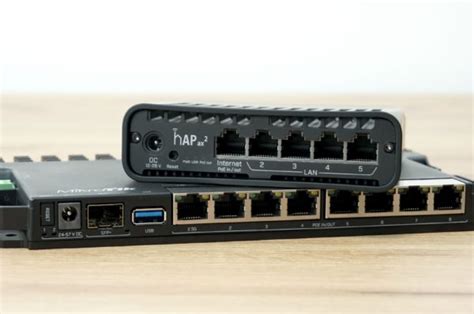
In my own setup, I use a MikroTik RB5009. It is more advanced than the router most internet providers hand out, but that is exactly why I like it. It gives me more control over the network, device separation, and the tools I can run around it.
View the MikroTik RB5009 product page
MikroTik is not the easiest beginner option. There is a learning curve. But if you want to understand and shape your network instead of accepting the defaults, that control is valuable.
Pi-hole is where it starts to feel differentOne of the best upgrades you can add to a smarter network is Pi-hole.
Pi-hole blocks ads and tracking at the DNS level. DNS is like the phonebook your devices use to find websites. With Pi-hole in place, many ad and tracking requests can be blocked before they fully reach your device.
Read the official Pi-hole documentation
The benefit is that the filtering can apply across the network. Instead of blocking ads only in one browser on one computer, you can reduce ads and trackers across phones, laptops, tablets, smart TVs, and other connected devices.
It is not perfect. Some platforms serve ads in ways that DNS filtering cannot easily block. Some apps work around it. Setup takes more technical comfort than installing a browser.
But the point is control.
Why this mattersWhen you remove some of the noise from your own internet experience, you notice how much better digital spaces feel when they respect your attention.
Pages load cleaner. Videos feel less interrupted. Devices send fewer junk requests. You start to see the difference between a digital experience that helps you and one that constantly tries to extract attention from you.
That is the larger lesson for anyone building online: less noise usually creates more trust.
A simple path to start- Start with Brave Browser if you want the easiest win.
- Watch YouTube through Brave and compare the experience.
- Clean up browser extensions and notification permissions.
- Consider a smarter router if you want more network control.
- Look into Pi-hole when you are ready for network-level blocking.
You do not have to do everything at once. Start with the browser. If you like the quieter experience, then decide whether it is worth going deeper into the network side.
For me, that path led from simple ad blocking to a smarter home network, a MikroTik RB5009, and Pi-hole. It took more learning, but it made the internet feel more like a tool again.

Got a take?